Welcome to the official site of HSP and HSPiP
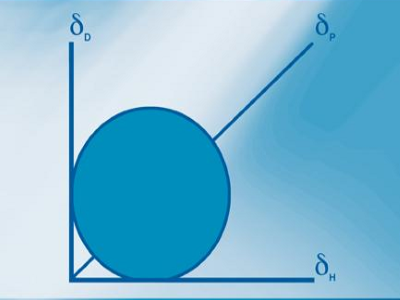
For more than 50 years Hansen Solubility Parameters, HSP, have proven to be a powerful, practical way to understand issues of solubility, dispersion, diffusion, chromatography and more. From academic labs to industrial applications users have been able to formulate intelligently using the key insight that solvents, polymers, nanoparticles etc. can be well characterised by just three parameters δD for Dispersion (van der Waals), δP for Polarity (related to dipole moment) and δH for hydrogen bonding. What other technique can, for example, show that two bad solvents can predictably combine to form a good solvent?
HSP Science
The three Hansen Solubility Parameters of, for example, a solvent, a polymer, a nanoparticle or an excipient provide a simple but powerful way to better formulation. Explore the science of HSP and see how you can use them in your own application.
Find out More
Buy HSPiP
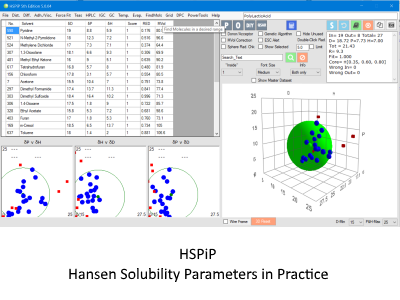
HSPiP first appeared in 2008 and continues to be enhanced with powerful new features to meet the needs of our large, and expanding, worldwide user base. It is a powerful set of tools that bring HSP to life via a combination of software, datasets and a large eBook.
Buy HSPiP

Charles Hansen
Dr Charles Hansen had the vision more than 50 years ago to create a practical solubility tool that could be used across a wide range of topics from polymers to DNA. Find out more about Dr Hansen, his book and his publications.
Find out MoreMore predictive power
HSP have proven to be more powerful than ill-defined notions such as "polar" and "non-polar" or "hydrophilic" and "hydrophobic". And it is most unfortunate that so many attempts are made to describe complex behaviour in terms of a monodimensional number such as LogP, the octanol-water coefficient. The three numbers of HSP capture what formulators recognise as three different components of a substance, in a way that LogP simply cannot do. HSP provide explanations for phenomena, but importantly they also have predictive power.
Other tools are available - but HSP is the most useful!
In some cases, for example, the heavily parameterised UNIFAC technique can provide superior predictions. Or the quantum-chemistry basis of the COSMO-RS approach (e.g. in the COSMOtherm packages) might well appeal to those requiring precise predictions in well-defined formulations. Other approaches such as Abraham parameters and NRTL-SAC each have their unique capabilities. A good formulator uses the right tools for the job at hand and we are happy to acknowledge that there are other approaches to solubility phenomena. However, we believe that if you have to use just one tool then it should be HSP, because it works well across such a wide range of real-world problems. See the HSP Examples in the HSP Science menu.
For the practical formulator, publications and patents
With the advent of HSPiP - Hansen Solubility Parameters in Practice which provides software, datasets and an eBook all in one package, the use of HSP has expanded considerably and its predictive power is easier to apply. The number of publications and patents quoting HSPiP has grown rapidly in recent years - yes, HSPiP's predictive power extends to creating novel patents in a wide range of areas from cosmetics to vapour liquid equilibria. The large HSPiP user community is always pushing the boundaries of what is possible and the package is now in its 5th major iteration. Because so many improvements come from suggestions from the user community they all receive free upgrades to new versions. And with strong, free, technical support (including an initial 1-hr on-line live tutorial) the user community is able to develop its own skills base. But note that HSPiP would not have been possible without the "bible" of HSP - Charles Hansen's Hansen Solubility Parameters, A User's Handbook, 2nd Edition from 2007 - which has become a CRC Classic.
Polymers, Nanoparticles, Solvents, DNA, Gloves, Skin ...
HSP started life as an attempt to understand the solubility of polymers in solvents and solvent blends. The key early insight that two bad solvents could create a good solvent enabled totally new ways to work with polymers. But it became apparent that pigments, gloves, nanoparticles, DNA, skin, etc. could all be described in HSP terms and interactions not only with solvents but with plasticisers, aroma chemicals, food-stuffs etc. could all be helpfully described. That's why HSP are found just about everywhere that formulators are formulating.
Exploration
The site allows you to explore key aspects for HSP. Get to know Charles Hansen, find out about diffusion controversies, see what HSPiP can do, try out some simple HSP "apps" and if you wish, purchase a copy of the HSPiP.
About this site
The site is written and maintained by (and the apps are written by) Prof Steven Abbott. The content is a combined effort from the HSPiP team, Steven, Charles and Hiroshi.